Written exams in StudyDrome

MCQ and mixed-format exams, from one bank

StudyDrome Exam Manager delivers MCQ and mixed-format written exams from a shared item bank. It supports eleven question types, six of which mark themselves. Publishing freezes the paper as an immutable snapshot of 40 record types. KR-20 or Cronbach's alpha then runs automatically, with the standard error of measurement beside it.

How do you assemble a written exam?

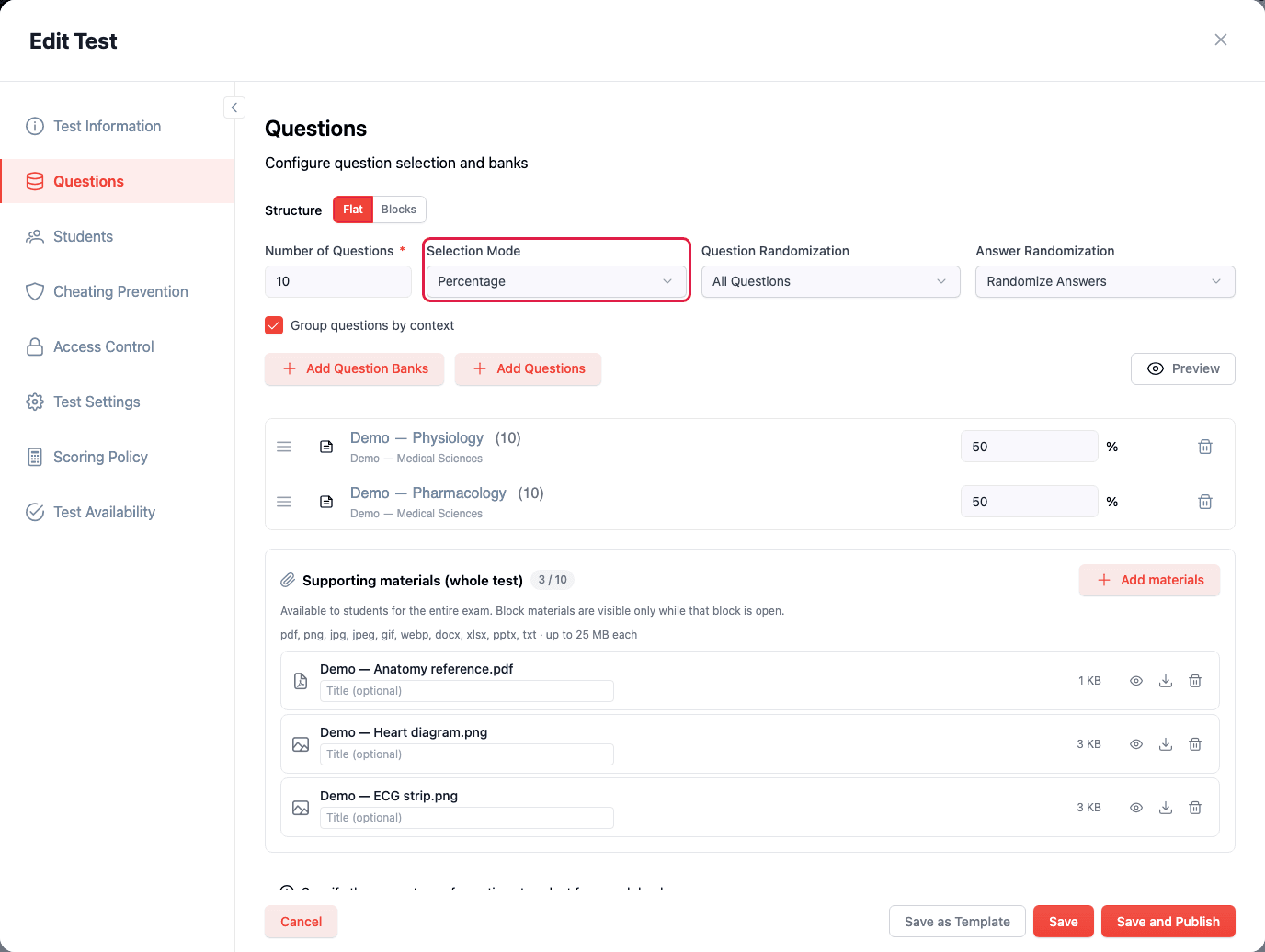
Authoring walks eight named steps: Test Information, Questions, Students or Course Groups, Cheating Prevention, Access Control, Test Settings, Scoring Policy, Test Availability. A paper is built from named questions, from banks, or from both interleaved. When you draw from banks, three modes decide the mix:

  • Full Random: Draws from all selected banks with no per-bank quota.
  • Percentage: Assigns a share to each bank. Publishing is blocked unless the shares total 100%.
  • Exact Number: Assigns a literal count per bank.
  • Randomisation: Question order can be left alone, shuffled across the paper, or shuffled within each contributing bank. Answer options shuffle independently.

Which question types can a written exam use?

Eleven types, mirrored value-for-value between the API and the app.

Type

Marking

Multiple Choice

Automatic, all-or-nothing

True/False

Automatic, all-or-nothing

Checkboxes

Automatic, partial credit optional

Sequence

Automatic, partial credit optional

Matching

Automatic, partial credit optional

Fill in the Blank

Automatic, partial credit optional

Essay

Grading queue

Short Answer

Grading queue

File Upload

Grading queue

OSCE Station

Examiner app

Likert Scale

Excluded from scoring by design

Partial-credit formulas are fixed in code. Checkboxes subtracts wrong selections before dividing, then clamps at zero. Sequence scores by correct position, Matching by correct pair.

Each question carries a decimal point value. A tenant can set an account-wide minimum, bounded 0 to 1000, and 0 means no minimum applies.
What happens when you publish a written exam?

  1. 1
    Publishing runs seventeen steps inside one transaction. First it supersedes any active publication.
  2. 2
    Then it copies the whole delivery graph into 40 published record types: items, banks, questions, answers, case vignettes, the resolved roster, grading scales, images and access codes.
  3. 3
    Only one publication is Active. Candidates mid-attempt on a superseded version keep working against it. New attempts bind to the Active version.
  4. 4
    Attempt caps are enforced across every publication of the original test. Republishing does not hand a candidate a fresh allowance.
  5. 5
    Six settings stay live-editable without republishing: grader anonymity, results detail, teacher attempt visibility, teacher grading permission, grading deadline type and grading day limit.

How do you control who sits the exam?

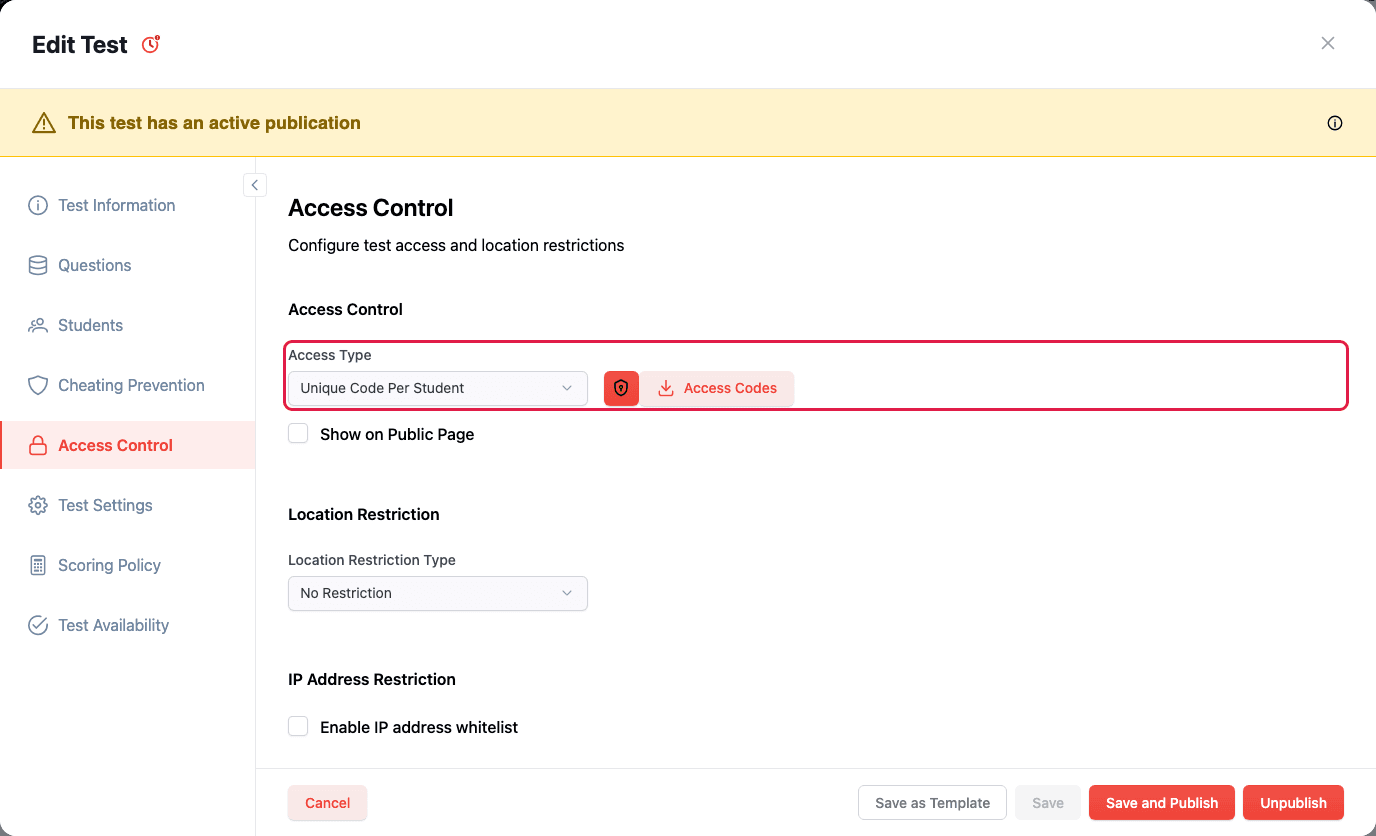
Three independent layers, configured in two wizard steps.

  • Access codes: Unique per candidate or shared across the cohort. The system tracks code staleness.
  • Address rules: Checked when a candidate prepares, starts and resumes — not only at the first check.
  • Device binding: Ties an attempt to the device it started on. When hardware genuinely fails, a proctor resets the fingerprint from the dashboard.
  • Availability: Either always-on from publication, or defined entirely by calendar events. In calendar mode, the exam is unavailable outside every occurrence.
  • Cheating prevention: Eight controls. Block copy, block paste, force fullscreen and detect window leave, plus warn-after and finish-after thresholds you set per exam. A candidate is warned first, and the attempt is finished only once your own limit is passed.

What do invigilators see during the exam?

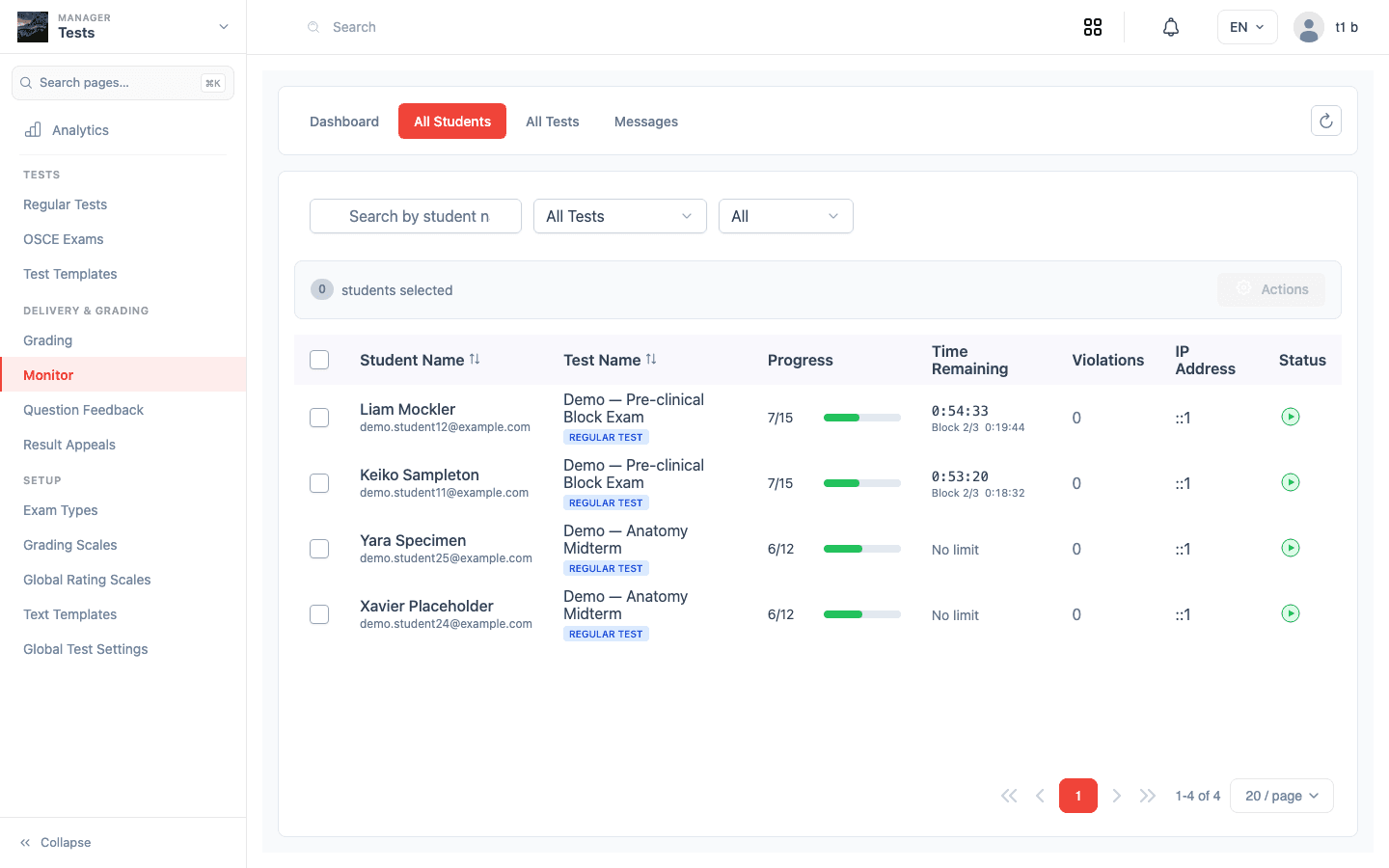
The Monitor dashboard lists live progress, time remaining, violation counts, IP address and session count. You can filter to candidates with violations.

  • It refreshes every 30 seconds, 1 minute or 5 minutes, or on demand. It is polling, not push, and we say so plainly.
  • Push runs the other way. Warnings, proctor messages, granted time and forced submission reach the candidate in real time.
  • A proctor can adjust time by up to 120 minutes either way. That works per candidate or across the whole exam.
  • The server owns the clock. It runs against the attempt's own limit, so an extension takes effect at once.
  • If a candidate's connection drops, answers persist locally and sync on reconnect.

How is written work marked?

Essays, short answers and file uploads land in a grading queue with a kanban board view. You assign a grader specific work, or give them a grade-all scope.

Blind marking is enforced server-side, not just hidden in the interface. Regrading is safe. Un-grade an answer and totals recalculate. The sequential grading history records every step.

We wrote up the most common exam-day support call in what happens when a candidate loses internet mid-exam.

Which statistics does a written exam produce?

Reliability is chosen for you. KR-20 runs when every scorable item is multiple choice or true/false and no item type allows partial credit. Otherwise Cronbach's alpha runs. The report names the method.

The coefficient becomes a five-tier verdict, verbatim from the API:

Coefficient

Verdict

0.90 and above

Excellent — suitable for high-stakes decisions

0.80 to 0.89

Good — suitable for most assessment purposes

0.70 to 0.79

Acceptable — adequate for classroom testing

0.60 to 0.69

Questionable — consider revision

Below 0.60

Poor — significant measurement error

Per item you get the difficulty index, the top/bottom-27% discrimination index, distractor analysis, and automatic Good, Review or Poor flags. Negative discrimination is the only trigger that marks an item Poor on its own.

Items with fewer than 10 responses are marked "Insufficient Data". Their flags are discarded rather than shown. Reliability uses each candidate's latest attempt only, so retakes cannot inflate it.

For the underlying method, read the complete guide to item analysis.

How does the scoring model work?

  • Every question carries a decimal point value, and a tenant can set an account-wide minimum between 0 and 1000.
  • Partial credit applies to checkboxes, sequence, matching and fill in the blank, with formulas fixed in code.
  • Checkboxes subtracts wrong selections before dividing, then clamps at zero, so a score never falls below zero.
  • Multiple choice and true/false are all-or-nothing: one selection, one key.
  • Difficulty is author-assigned on a 0–10 scale in four named bands, and feeds difficulty-weighted scoring.
  • The empirical p-value is measured separately, from candidate responses, in item analysis.

Written exam specification

Area

Detail

Assembly

Fixed questions, bank sampling, or both interleaved. Three bank modes.

Randomisation

Question order: none, all, or by bank. Answer order: none or shuffled.

Timing

No limit, or a limit in whole minutes. The server owns the clock.

Attempts

Capped, and counted across every publication of the test.

Availability

Always available on publish, or calendar-driven windows.

Difficulty

Author-assigned 0–10, in four named bands. The empirical p-value is measured separately in item analysis.

Integrity

Eight controls, four detected violation types, access codes, address rules, device binding.

Monitoring

30 s / 1 min / 5 min refresh. Real-time push to the candidate.

Marking

Auto-marking, grading queue, blind marking, grading history, grade-all scope.

Statistics

KR-20 or alpha, SEM, p-value, 27% discrimination, distractor analysis, point-biserial via API.

Import

Excel and Word with image extraction. Parse, preview, then commit.

Frequently asked questions

How many question types does StudyDrome support for written exams?

Eleven, mirrored value-for-value between the API and the app. Six mark themselves: multiple choice, true/false, checkboxes, sequence, matching and fill in the blank. Essay, short answer and file upload route to a grading queue. OSCE station goes to the examiner app. Likert is excluded from all scoring maths by design.

Can candidates be given extra time during a written exam?

Yes. A proctor can adjust time by up to 120 minutes either way. That works for one candidate or across the whole exam. The change reaches the candidate as a real-time push. The server owns the clock. It runs against the attempt's own adjusted limit, not the published one.

How does partial credit work?

Partial credit is available on checkboxes, sequence, matching and fill in the blank, with formulas fixed in code. Checkboxes subtracts wrong selections before dividing and clamps the result at zero, so a score never falls below zero. Sequence scores by correct position, matching by correct pair. Multiple choice and true/false stay all-or-nothing.

How does blind marking work?

Blind marking is enforced on the server, not just hidden in the interface. A per-exam setting controls whether graders see candidate names. It is one of six settings you can change on a live exam without republishing. Every grading action lands in a sequential history. That history is what an appeal panel asks to see.

What happens if a candidate loses connection mid-exam?

Answers persist in local storage and sync automatically when the connection returns. A failed submit is queued and retried. The server owns the clock, so a dropout does not quietly extend or shorten the attempt. A proctor can also grant extra time from the Monitor dashboard.

Can we run a written exam and an OSCE from the same item bank?

Yes. An OSCE station is a question type. Stations and MCQs live in the same bank, under the same tags and clinical skills. The same analytics engine serves both. The Exam Manager hub covers how the two exam types share the bank. The OSCE page covers station-based delivery.

Book a pilot